

It was early, I hadn’t had my first coffee yet, and I was barely awake. As I do every morning, I sat down at my computer to check the previous night’s messages. I was surprised to find an email from my wife — apparently an unpaid invoice. The amount gave me pause right away. Still, the email had the look of something from a legitimate company, so I examined it more carefully. And then… I started noticing details. Small things that didn’t add up. Only then did it hit me, and I thought: “For crying out loud.” I had just spent more than five minutes going over a scam.
I’ve been working on the internet for over two decades — which means I’ve been working with email for just as long. In that time I’ve seen fraud attempts and scams of every variety, so it surprised me how long it took to realize what I was looking at. To be fair, my mental sharpness in the early morning leaves something to be desired. Even so, I can count on one hand the number of times it’s taken me that long to spot a fraud attempt (then again, maybe I’m just getting older).
Some scams have grown increasingly sophisticated over time, and the people behind them never stop finding new ways to reel us in. But despite the many forms fraud can take, the underlying mechanics of most fraudulent emails are almost always the same. A handful of strategies can protect us from the vast majority of scam attempts — or at least put us on alert.
Recognizing the Warning Signs
We live in a world saturated with information, and paying close attention to everything that lands in our inbox is practically impossible. Fraud thrives precisely in the gaps in our attention. That’s why the first step in protecting yourself from fraudulent emails is learning to recognize the warning signs that should put you on guard.
If you’re short on time and want the quick version, here’s a list of the most common red flags. An email may be fraudulent if it:
- Claims that something is at risk, or that you could lose or miss out on something important.
- States that you need to act urgently.
- Asks you to make a payment, provide sensitive information (personal data, payment details, passwords, etc.), or download a file.
- Addresses you in generic terms (e.g., “Dear Customer”) and provides few details that would confirm the message was actually written for you specifically rather than sent in bulk.
- Contains strange, inconsistent, or poorly written language.
If you’re unsure whether an email you’ve received is a scam, review it carefully and when in doubt, reach out to someone you trust who has experience in this area.
Scammers Don’t Want You to Think
The more carefully you examine a fraudulent email, the more likely you are to spot something that doesn’t add up. That’s exactly why scammers try to get you to act fast and think as little as possible.
In the physical world, most of us have experienced situations where someone pressured us — in person or over the phone — to make an immediate decision (sign a contract, make a purchase, agree to something at work) that we later regretted. With email, scammers can’t apply that direct pressure, so they rely on a psychological trick instead: creating the impression that you have something to lose.
We’re hardwired to avoid losing anything we consider important. When we believe something we value — our money, our privacy, our job — may be at risk, we have a visceral reaction. The message grabs our full attention almost like a spell. Stepping back and thinking clearly in that state takes a conscious effort, which is precisely why scammers use this tactic so often.
The same effect kicks in when we feel we might miss the chance to get something valuable with minimal effort. Our brain treats the potential gain as if it were already ours and generates an urge to secure it. In both scenarios, momentum pushes us toward impulsive, unreflective action — which is why we tend to make worse decisions. This effect intensifies when urgency is added to the mix, so fraudulent messages frequently pressure recipients to act quickly to prevent a supposed threat or seize a fleeting opportunity.
Some common examples of this tactic include messages claiming that:
- Your computer has been hacked.
- Someone has accessed your bank account.
- Your company’s email address is no longer active.
- You need to verify your identity or recover your account.
- Access to your bank account or deposits has been blocked.
- You’ve been selected as the winner of a contest you never entered.
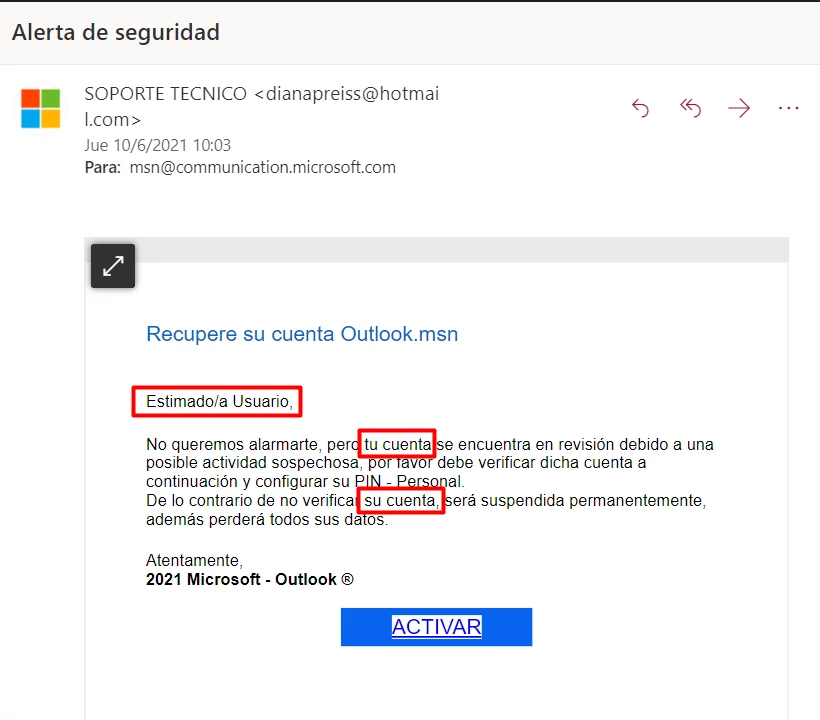
A message requesting account reactivation. It doesn’t specify which account, and the language is suspiciously vague.
A Fraudulent Email Always Wants Something From You
Now I’m going to state the obvious, so try not to roll your eyes — or take it out on your keyboard: a fraudulent email always wants something from you, and it’s almost always your money. (I know, but I did warn you.)
Some messages go straight for the ask and try to get you to make a payment directly. Others are more sophisticated and try to convince you to hand over information that would give them access to your credit card or bank account — whether by filling out a form or downloading a file that lets them access or take control of your computer, either to steal your data or to hold it for ransom.
To avoid falling into the trap, exercise extra caution whenever you’re asked to send a payment, provide or update payment information, or share personal data — especially login credentials or passwords. Only click a link or open an attachment when you’re absolutely certain the message is legitimate. And under no circumstances let anyone install software on your device.
The Numbers Game
Email fraud is a numbers game: send a message to thousands of people and only a tiny fraction needs to take the bait for the scheme to be profitable. If a scammer sends 10,000 messages and tricks just 0.3% of recipients, that’s 30 people who were probably already having a rough day — and are now having a much worse one.
Running an email scam doesn’t require great sophistication, because there’s always a small probability that someone will fall for it. The scammer just needs to contact enough people for the statistics to work in their favor (if you already had a reason to dislike math, now you have another one).
At the same time, fraud attempts become especially dangerous when we believe the message was written specifically for us rather than sent in bulk. To sustain that illusion, fraudulent messages tend to be vague and full of generalities — generic greetings (Dear Customer, Hello…) and abstract references to “your account,” “your invoice,” “your service,” and so on. This way, scammers can reach a large number of people with minimal effort.
That’s also why many fraudulent messages are poorly written. By sending messages in multiple languages, scammers simply aim to maximize their reach without investing much time or care in the writing — so correct grammar and polished prose are rarely a priority.
Unmasking Fraud
Imagine a message that opened like this:
Dear User,
Allow me to introduce myself. I am an internet scammer and my goal is to take your money…
Now that would be a genuinely suspicious message.
Unfortunately, honesty is not a prized quality in the scamming profession, so fraudsters always disguise their messages to look like they come from people or companies we know. This is no accident. In general, we tend to trust people and institutions we’re familiar with — especially those with a good reputation. That makes us more receptive to their requests and increases the likelihood that we’ll comply.
Impersonating someone else online, however, is straightforward with even basic technical knowledge. That’s why you should never trust a message solely based on who it appears to come from.
Despite the security measures introduced in recent years to prevent it, manipulating a message to make it look as though it came from a specific person or email address remains surprisingly easy. Receiving an email from an address you recognize is absolutely no guarantee that the message is legitimate.
Paying Attention to Detail: How to Unmask Scams
At the beginning of this article, I described how details were key to recognizing the fraud. If you know where to look, fraudulent emails always contain something that gives them away. “Why didn’t you start there?” you might ask. Simple: my goal is to give you tools to identify fraudulent emails without needing technical knowledge. And to spot those details, you first need to be paying attention. Otherwise, they’re easy to miss.
Email Address
The sender’s email address never guarantees the identity of the person who sent the message. As I mentioned earlier, there are relatively easy ways to impersonate someone else using their name and email address. That said, the sender’s address can still provide valuable clues when:
- The domain of the email address doesn’t match the name of the company or institution that supposedly sent it (for example, if you receive a message from Amazon where the address is something like amazon@myshop.xyz).
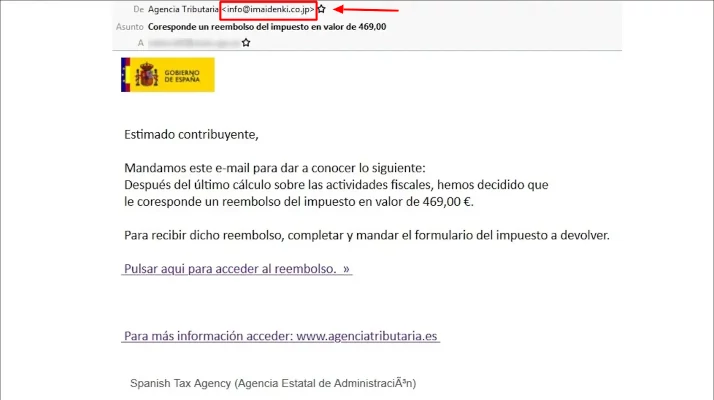
A supposed message from the Spanish tax authority sent from a .jp (Japan) domain.
- A company sends you a message from a free email service (Gmail, Hotmail, Outlook, etc.).
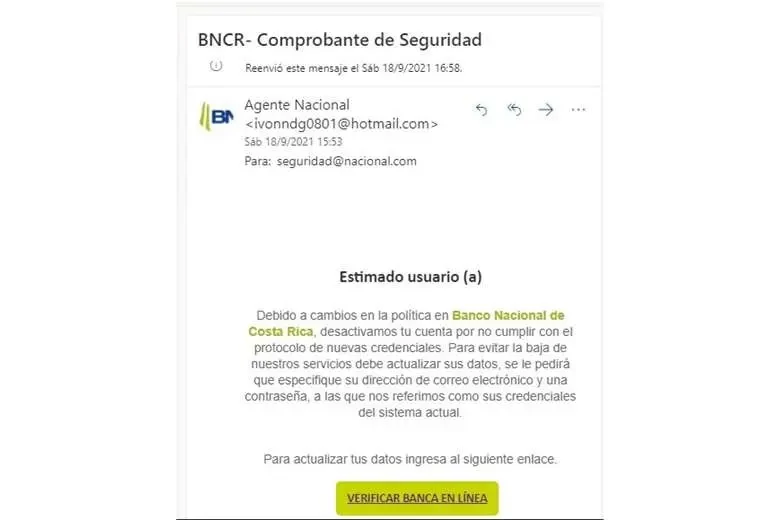
A message asking for bank account verification, sent from a Hotmail.com address.
- When you hit “Reply,” the address in the To field is different from the address that supposedly sent you the email. If you’re a more advanced user, you can also check the “reply-to” field in the email headers.
- The sender’s domain looks similar to a legitimate brand’s domain but isn’t quite right (for example, netxflix.com or accounts-netflix.com instead of netflix.com).
Links
When a message contains a link, the temptation to click is strong. But before you do, check that the link actually goes where you think it does. Just like with email addresses, disguising a link is child’s play. Sometimes scammers use a domain that looks similar to the company they’re impersonating (at Registros.com we block registration attempts of this type of domain on a daily basis). More often, though, the link text (what you see in the message) and the actual destination are simply different. To check, just hover your cursor over the link without clicking. The bottom bar of your browser or email client will show you the real destination URL.
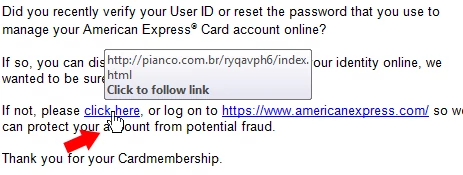
This fake American Express message links to a completely different website.
Conclusion: Never Underestimate Fraud
Interestingly, the simple fact that you’ve read this article already reduces your chances of falling victim to an email scam. And no, that has nothing to do with my (hopefully entertaining and informative) explanation. The fact that you’re aware that fraud exists and are actively learning how to avoid it is the first and most important layer of protection.
That said, no one is completely immune to being scammed. Email fraud generates losses of billions of dollars every year, which means there are more victims than any of us would like. Most fraud attempts are fairly easy to recognize — but some scams are genuinely sophisticated. So stay alert, and don’t let your guard down.